Thursday, 26 January 2012

Jquery no conflict method

Since a long days, i was facing a common issue with using jQuery.

i.e. Different jquery frame works that i need to run my application smoothly was conflicting with each other.

If i implement 1, the other does not function well.

At last i came across the following technique while using jquery tabs.
<script>
var $t = jQuery.noConflict();    // assign the main jQuery object to $j
$t(function() {
$t("ul.leftsiteappslist").tabs("div.css-panes > div", {effect: 'ajax', history: true});
});
</script>

Now my conflict problem is solved.

Thursday, 19 January 2012

Simple facebook type jquery search engine lightning fast

Dear Friends,

I'm Swadesh, a young software engineer who is always fascinated about facebook applications.

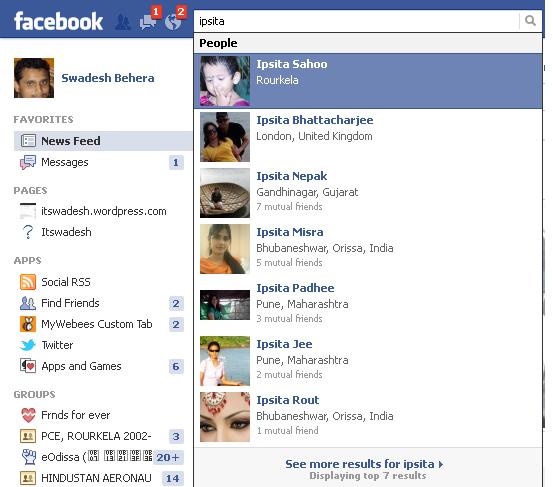
Once i came across facebook search bar which search for friends, communities, applications, etc.


I was always wondering how the search is so quick (The result comes instantly). After a long period of research and study, i was finally able to simulate the amazing feature.

Here is the trick that worked for me

Step-1: Include Jquery and some css into your page
<script src="js/jquery.min.js">

<link href="search_style.css" rel="stylesheet" type="text/css"/>

Step-2: We will now write javascript which will collect data available at DOM, if necessary it will search through the whole database.

The javascript search idea
  • on page load, “Load all data of friends from database into DOM”
  •  Declare an array which will hold the DOM data
  • Push the DOM data into the javascript array
  • Handle the keyup event which will subsequently search for the javascipt array object. If not found it will call the ajax function which will collect data from database.
  • Push the retrieved data again into the DOM and search from there

Step-3: The div tag to hold the loaded result & the place to display the result
<input type="text" id="ipi"></input>
<div id="search_result" style="display:none;">

</div>
<div id="sr">

</div>

Wednesday, 18 January 2012

jquery visitors flip counter like digital clock

I was visiting a website called stepout.com. I came across this members counter which seem to be cool. So here i explain it for you, how it is done.


Step-1 : We start by adding some jquery plugins and css to our page


 <!-- jQuery from Google CDN, REQUIRED -->
    <script type="text/javascript" src="http://ajax.googleapis.com/ajax/libs/jquery/1.5/jquery.min.js"></script>
    <!-- My flip counter script, REQUIRED -->
    <script type="text/javascript" src="js/flipcounter.min.js"></script>
    <!-- Style sheet for the counter, REQUIRED -->
    <link rel="stylesheet" type="text/css" href="css/counter.css" />

    <!-- jQueryUI from Google CDN, used only for the fancy demo controls, NOT REQUIRED for the counter itself -->
    <script type="text/javascript" src="http://ajax.googleapis.com/ajax/libs/jqueryui/1.8.6/jquery-ui.min.js"></script>
    <!-- Style sheet for the jQueryUI controls, NOT REQUIRED for the counter itself -->
    <link rel="stylesheet" type="text/css" href="http://ajax.googleapis.com/ajax/libs/jqueryui/1.8.6/themes/vader/jquery-ui.css" />
    <!-- Style sheet for the demo page, NOT REQUIRED for the counter itself -->
    <link rel="stylesheet" type="text/css" href="css/demo.css" />

Step-2 : Next job is to put some div tags where it will be displayed


<li>Increment:
            <span id="inc_value">123</span> <a href="#">[?]</a><div id="inc_slider"></div>
            <div>
                <p>This slider controls the counter increment by using the <b>setIncrement</b> method:</p>
                <code>myCounter.setIncrement(value);</code>
            </div>
        </li>

Step-3 : Our next job is to have some javascript customization


<script type="text/javascript">
    //<![CDATA[

    // Initialize a new counter
    var myCounter = new flipCounter('counter', {value:10000, inc:123, pace:800, auto:true});

    $(function(){

        /**
         * Demo controls
         */

        var smartInc = 0;

        // Increment
        $("#inc_slider").slider({
            range: "max",
            value: 123,
            min: 1,
            max: 1000,
            slide: function( event, ui ) {
                myCounter.setIncrement(ui.value);
                $("#inc_value").text(ui.value);
            }
        });

        // Pace
        $("#pace_slider").slider({
            range: "max",
            value: 800,
            min: 100,
            max: 1000,
            step: 100,
            slide: function( event, ui ) {
                myCounter.setPace(ui.value);
                $("#pace_value").text(ui.value);
            }
        });

        // Auto-increment
        $("#auto_toggle").buttonset();
        $("input[name=auto]").change(function(){
            if ($("#auto1:checked").length == 1){
                $("#counter_step").button({disabled: true});
                $(".auto_off_controls").hide();
                $(".auto_on_controls").show();

                myCounter.setPace($("#pace_slider").slider("value"));
                myCounter.setIncrement($("#inc_slider").slider("value"));
                myCounter.setAuto(true);
            }
            else{
                $("#counter_step").button({disabled: false});
                $(".auto_off_controls").show();
                $(".auto_on_controls").hide();
                $("#add_sub").buttonset();
                $("#set_val, #inc_to, #smart").button();
                myCounter.setAuto(false).stop();
            }
        });
        $("#counter_step").button({disabled: true});
        $("#counter_step").button().click(function(){
            myCounter.step();
            return false;
        });

        // Addition/Subtraction
        $("#add").click(function(){
            myCounter.add(567);
            return false;
        });
        $("#sub").click(function(){
            myCounter.subtract(567);
            return false;
        });

        // Set value
        $("#set_val").click(function(){
            myCounter.setValue(12345);
            return false;
        });

        // Increment to
        $("#inc_to").click(function(){
            myCounter.incrementTo(12345);
            return false;
        });

        // Get value
        $("#smart").click(function(){
            var steps = [12345, 17, 4, 533];

            if (smartInc < 4) runTest();

            function runTest(){
                var newVal = myCounter.getValue() + steps[smartInc];
                myCounter.incrementTo(newVal, 10, 400);
                smartInc++;
                if (smartInc < 4) setTimeout(runTest, 10000);
            }
            $(this).button("disable");
            return false;
        });

        // Expand help
        $("a.expand").click(function(){
            $(this).parent().children(".toggle").slideToggle(200);
            return false;
        });

    });

    //]]>
    </script>
</body>

Tuesday, 3 January 2012

How to track online status of a user in my website like facebook

I came across this when i was developing 1 of my social website aFriend.in.

I found out a very simple solution using jQuery or Javascript
setInterval("update()", 10000); // Update every 10 seconds 
function update()
{
$.post("update.php"); // Sends request to update.php
}

Your update.php file would have a bit of code like this:
session_start(); 
if ($_SESSION["userid"])
updateUserStatus($_SESSION["userid"]);

This all assumes that you store your userid as a session-variable when users login to your website. The updateUserStatus() function is just a simple query, like the following:
UPDATE users SET lastActiveTime = NOW() WHERE userid = $userid 

So that takes care of your storage. Now to retrieve the list of users who are "online." For this, you'll want another jQuery-call, and another setInterval() call:
setInterval("getList()", 10000) // Get users-online every 10 seconds 
function getList()
{
$.post("getList.php", function(list)
{ $("listBox").html(list); });
}

This function requests a bit of HTML form the server every 10 seconds. The getList.php page would look like this:
session_start(); 
if (!$_SESSION["userid"]) die; // Don't give the list to anybody not logged in
$users = getOnlineUsers(); /* Gets all users with lastActiveTime within the last 1 minute */
$output = "<ul>";
foreach ($users as $user)
{
$output .= "<li>".$user["userName"]."</li>";
}
$output .= "</ul>";
print $output;

That would output the following HTML:
<ul> <li>Jonathan Sampson</li> 
<li>Paolo Bergantino</li>
<li>John Skeet</li> </ul>

That list is included in your jQuery variable named "list." Look back up into our last jQuery block and you'll see it there.

jQuery will take this list, and place it within a div having the classname of "listBox."
<div></div> 

Saturday, 24 December 2011

Creating a Simple Photo Album with jQuery Similar to Facebook

For the javascript part, I’ve decided to use jQuery as well as the jquery.cycle and jquery.lightbox plugins.


HTML structure


The HTML code needed for a gallery like this is actually rather simple. All we have to do, is to print the images as plain old linked HTML images and wrap image collections in container elements (DIVs).


<h1>My Photo Collection</h1>

<p id="intro">

  This is my photo album...yaddi-yaddi-ya...

</p>

<div class="album">

  <h2>Wicked Album</h2>

  <a href="photos/image1.jpg">

    <img src="photos/thumb_image1.jpg" alt="Lorem" />

  </a>

  <a href="photos/image2.jpg">

    <img src="photos/thumb_image2.jpg" alt="Ipsum" />

  </a>

  <a href="photos/image3.jpg">

    <img src="photos/thumb_image3.jpg" alt="Lorem" />

  </a>

</div>

<div class="album">

  <h2>Wickier Album</h2>

  <a href="photos/image4.jpg">

    <img src="photos/thumb_image4.jpg" alt="Ipsum" />

  </a>

  <a href="photos/image5.jpg">

    <img src="photos/thumb_image5.jpg" alt="Yadi" />

  </a>

  <a href="photos/image6.jpg">

    <img src="photos/thumb_image6.jpg" alt="Yadi" />

  </a>

  <a href="photos/image7.jpg">

    <img src="photos/thumb_image7.jpg" alt="Ya" />

  </a>

</div>

<div class="album">

  <h2>Wickiestest Album</h2>

  <a href="photos/image8.jpg">

    <img src="photos/thumb_image8.jpg" alt="Lorem" />

  </a>

  <a href="photos/image9.jpg">

    <img src="photos/thumb_image9.jpg" alt="Ipsum" />

  </a>

</div>


The Magic of jQuery Plug-Ins


In order to turn this into something a bit more exciting than a bunch of linked images with a blue border, we add some JavaScript and CSS to the page.

First, make sure to include jQuery, jQuery Cycle and jQuery Lightbox to the page. Then add the following JavaScript code to another .js-file that is loaded into the same page:


$(document).ready( function() {

  // Dynamically add nav buttons as these are not needed in non-JS browsers

  var prevNext = '<div id="album-nav"><button ' +

                   'class="prev">&laquo; Previous' +

                   '</button><button>' +

                   'Next &raquo;</button></div>';

  $(prevNext).insertAfter('.album:last');

  // Add a wrapper around all .albums and hook jquery.cycle onto this

  $('.album').wrapAll('<div id="photo-albums"></div>');

  $('#photo-albums').cycle({

    fx:     'turnDown',

    speed:  500,

    timeout: 0,

    next:   '.next',

    prev:   '.prev'

  });

  // Remove the intro on first click -- just for the fun of it

  $('.prev,.next').click(function () {

    $('#intro:visible').slideToggle();

  });

  // Add lightbox to images

  $('.album a').lightBox();

});


You may of course remove the cycling effect.
The only JavaScript you’d then need is $('.album a').lightBox();.

Adding Style Info


Last, we add some style info to make our albums look at least somewhat good.


/** for this example, I don't give a rats (*) about IE */

.album {

  width: 600px !important;

  clear: both;

}

.album h2 {

  clear: both;

}

.album a {

  display: block;

  float: left;

  margin-right: 1em;

  padding: 0.5em;

  border: 1px solid black;

  background-color: #eee;

  text-align: center;

}

.album a:hover {

  border-color: blue;

}

.album img {

  width: 72px;

  height: 100px;

  border: 0;

}

#album-nav {

  margin-top: 1em;

  max-width: 500px;

}

.prev, .next {

  border: 1px outset #ccc;

  color: #000075;

  background-color: white;

  font-weight:bold;

  padding: 0.25em;

}

.prev:hover,.next:hover {

  border-style: inset;

}

.prev {

  float: left;

}

.next {

  float: right;

}


Finish!

Friday, 23 December 2011

Lets see how facebook search is so fast

Some days before i came across a very well known website called facebook. And i was always wondering how can such a heavily loaded website be so seamlessly fast.

After a continuous google search, i found that they use AJAX and JQuery extensively with differnet caching technologies along with the following latest technologies.

1. Bigpipe
2. Comet (programming) or "Reverse Ajax"

I have implemented a simple reverse ajax in my website fb.walletchange.com/profile.php @ the search portion. You can mark a remarkable change in search time after implementing the same.

The trick goes like this


a) Load a static page first

b) Pull the data as soon as the page loads using ajax into a hidden div

c) Use jQuery to organise the data for perfect user interactivity


a) Lets create our page layout div first


<DIV id=main>
<H1>Facebook type instant search engine - super speed
</H1>
Filter friends list : <INPUT id=filter>
<DIV id=container>
<DIV>
<UL>
<?php
while($row=mysql_fetch_array($sql_res))
{
$username=$row['username'];

?>
<LI>
<DIV>
<DIV><?=$username?></DIV></DIV></LI>
<?php
}

?>
</UL></DIV></DIV></DIV>


b) We will proceed now by adding jQuery and instant search script and some style attributes to the page


<SCRIPT src="jquery.js"></SCRIPT>

<SCRIPT src="instant-search.js"></SCRIPT>

<STYLE>BODY {
FONT-WEIGHT: 300; FONT-SIZE: 16px; MARGIN: 0px 10%; COLOR: #333; FONT-STYLE: normal; FONT-FAMILY: 'Helvetica Neue', Helvetica, Arial, sans-serif
}
.name SPAN {
BACKGROUND: #fbffc6
}
UL {
PADDING-RIGHT: 0px; PADDING-LEFT: 0px; PADDING-BOTTOM: 0px; MARGIN: 0px; PADDING-TOP: 0px
}
UL LI {
BORDER-RIGHT: #ddd 1px solid; PADDING-RIGHT: 5px; BORDER-TOP: #ddd 1px solid; PADDING-LEFT: 5px; FONT-SIZE: 20px; BACKGROUND: #eee; FLOAT: left; PADDING-BOTTOM: 5px; MARGIN: 3px; BORDER-LEFT: #ddd 1px solid; WIDTH: 150px; LINE-HEIGHT: 70px; PADDING-TOP: 5px; BORDER-BOTTOM: #ddd 1px solid; LIST-STYLE-TYPE: none; HEIGHT: 70px; TEXT-ALIGN: center
}
#container {
BORDER-RIGHT: #b9b9b9 1px solid; BORDER-TOP: #b9b9b9 1px solid; MARGIN-TOP: 20px; BORDER-LEFT: #b9b9b9 1px solid; WIDTH: 100%; BORDER-BOTTOM: #b9b9b9 1px solid; HEIGHT: 440px; webkit-box-shadow: 0 0 15px #aaa; moz-box-shadow: 0 0 15px #aaa; box-shadow: 0 0 15px #aaa
}
#container .content {
OVERFLOW: auto; HEIGHT: 440px
}
#main {
MARGIN: 0px auto; WIDTH: 100%;
}
INPUT {
BORDER-RIGHT: #ddd 1px solid; BORDER-TOP: #ddd 1px solid; FONT-SIZE: 20px; BORDER-LEFT: #ddd 1px solid; BORDER-BOTTOM: #ddd 1px solid
}
A {
COLOR: #31499c; TEXT-DECORATION: none
}
H1 {
FONT-WEIGHT: normal; TEXT-ALIGN: center
}
</STYLE>