Showing posts with label Font. Show all posts

Friday, 23 December 2011

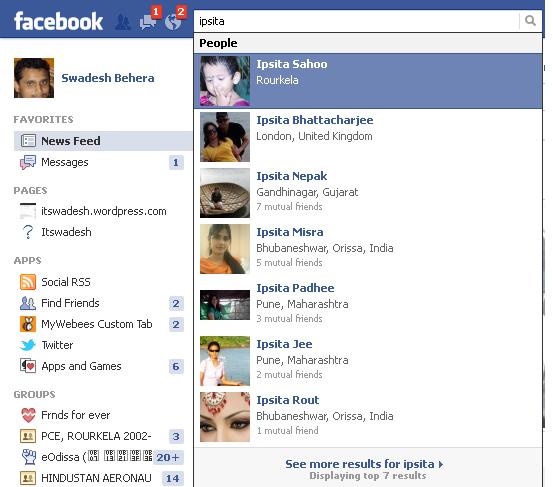
Lets see how facebook search is so fast

Some days before i came across a very well known website called facebook. And i was always wondering how can such a heavily loaded website be so seamlessly fast.

After a continuous google search, i found that they use AJAX and JQuery extensively with differnet caching technologies along with the following latest technologies.

1. Bigpipe
2. Comet (programming) or "Reverse Ajax"

I have implemented a simple reverse ajax in my website fb.walletchange.com/profile.php @ the search portion. You can mark a remarkable change in search time after implementing the same.

The trick goes like this


a) Load a static page first

b) Pull the data as soon as the page loads using ajax into a hidden div

c) Use jQuery to organise the data for perfect user interactivity


a) Lets create our page layout div first


<DIV id=main>
<H1>Facebook type instant search engine - super speed
</H1>
Filter friends list : <INPUT id=filter>
<DIV id=container>
<DIV>
<UL>
<?php
while($row=mysql_fetch_array($sql_res))
{
$username=$row['username'];

?>
<LI>
<DIV>
<DIV><?=$username?></DIV></DIV></LI>
<?php
}

?>
</UL></DIV></DIV></DIV>


b) We will proceed now by adding jQuery and instant search script and some style attributes to the page


<SCRIPT src="jquery.js"></SCRIPT>

<SCRIPT src="instant-search.js"></SCRIPT>

<STYLE>BODY {
FONT-WEIGHT: 300; FONT-SIZE: 16px; MARGIN: 0px 10%; COLOR: #333; FONT-STYLE: normal; FONT-FAMILY: 'Helvetica Neue', Helvetica, Arial, sans-serif
}
.name SPAN {
BACKGROUND: #fbffc6
}
UL {
PADDING-RIGHT: 0px; PADDING-LEFT: 0px; PADDING-BOTTOM: 0px; MARGIN: 0px; PADDING-TOP: 0px
}
UL LI {
BORDER-RIGHT: #ddd 1px solid; PADDING-RIGHT: 5px; BORDER-TOP: #ddd 1px solid; PADDING-LEFT: 5px; FONT-SIZE: 20px; BACKGROUND: #eee; FLOAT: left; PADDING-BOTTOM: 5px; MARGIN: 3px; BORDER-LEFT: #ddd 1px solid; WIDTH: 150px; LINE-HEIGHT: 70px; PADDING-TOP: 5px; BORDER-BOTTOM: #ddd 1px solid; LIST-STYLE-TYPE: none; HEIGHT: 70px; TEXT-ALIGN: center
}
#container {
BORDER-RIGHT: #b9b9b9 1px solid; BORDER-TOP: #b9b9b9 1px solid; MARGIN-TOP: 20px; BORDER-LEFT: #b9b9b9 1px solid; WIDTH: 100%; BORDER-BOTTOM: #b9b9b9 1px solid; HEIGHT: 440px; webkit-box-shadow: 0 0 15px #aaa; moz-box-shadow: 0 0 15px #aaa; box-shadow: 0 0 15px #aaa
}
#container .content {
OVERFLOW: auto; HEIGHT: 440px
}
#main {
MARGIN: 0px auto; WIDTH: 100%;
}
INPUT {
BORDER-RIGHT: #ddd 1px solid; BORDER-TOP: #ddd 1px solid; FONT-SIZE: 20px; BORDER-LEFT: #ddd 1px solid; BORDER-BOTTOM: #ddd 1px solid
}
A {
COLOR: #31499c; TEXT-DECORATION: none
}
H1 {
FONT-WEIGHT: normal; TEXT-ALIGN: center
}
</STYLE>

Friday, 6 May 2011

Create A Vertical Scrolling News Ticker With jQuery and jCarousel Lite


News Ticker is a fantastic way to present headlines or minor updates to your readers. The smooth scrolling effect will attract your readers and generate more clicks to your site.

There are a lot of great tutorials discussing on how to implement news ticker, however most of the tutorials that i found are not really suitable for a beginner. So, i decided to use jQuery and its plugin jCarousel Lite to create a simple yet powerful news ticker.

Why i choose jCarousel Lite? it is because jCarousel Lite is a tiny but powerful plugin. Furthermore, you can easily tweak/configure it to achieve different effects. News ticker is just a sample application for this plugin.

Let’s start to create our news ticker using jCarousel Lite. Download both jQuery and jCarousel Lite before we can start.

news-ticker

Step 1


Let’s create a blank index.htm file, and include jQuery and jCarousel Lite. Also, create a blank style.css file for later use.
<html>
<head>
<link rel="stylesheet" href="style.css" type="text/css" media="screen" />
<script src="jquery-latest.pack.js" type="text/javascript"></script>
<script src="jcarousellite_1.0.1c4.js" type="text/javascript"></script>
</head>
</html>

Step 2


In the same document, create a <div> and name it as “newsticker-demo”. Basically, this is the container for the news ticker. We will have another <div> class name “newsticker-jcarousellite”. Remember, this is very important and you will need to use the same class name when you configure jCarousel Lite.

Step 3


In the “newsticker-jcarousellite” <div>, create an <ul> element. Each news will be an individual <li> element. In this example, i had created 6 news, so i will have 6 <li> elements(but i am not going to show all). We will have the thumbnail float to the left, while the title and other information float to the right.
<li>
<div>
<a href="#"><img src="images/1.jpg"></a>
</div>
<div>
<a href="http://www.vladstudio.com/wallpaper/?knight_lady">
The Knight and the Lady</a>
<span>Category: Illustrations</span>
</div>
<div></div>
</li>

Step 4


After you created your <li> element, it is the time for us to configure the jCarousel. Under the <head>, add these scripts:
<script type="text/javascript">
$(function() {
$(".newsticker-jcarousellite").jCarouselLite({
vertical: true,
visible: 3,
auto:500,
speed:1000
});
});
</script>

The script itself is pretty straight forward. The “auto:500″ means it will auto-scroll every 500ms. There are a lot of options which you can configure easily. Refer the documentation for more information.

Step 5


Basically you had done everything, except styling your content. So, just copy and paste the scripts below in your style.css file.
* { margin:0; padding:0; }

#newsticker-demo {
width:310px;
background:#EAF4F5;
padding:5px 5px 0;
font-family:Verdana,Arial,Sans-Serif;
font-size:12px;
margin:20px auto;
}

#newsticker-demo a { text-decoration:none; }
#newsticker-demo img { border: 2px solid #FFFFFF; }

#newsticker-demo .title {
text-align:center;
font-size:14px;
font-weight:bold;
padding:5px;
}

.newsticker-jcarousellite { width:300px; }
.newsticker-jcarousellite ul li{ list-style:none; display:block; padding-bottom:1px; margin-bottom:5px; }
.newsticker-jcarousellite .thumbnail { float:left; width:110px; }
.newsticker-jcarousellite .info { float:right; width:190px; }
.newsticker-jcarousellite .info span.cat { display: block; font-size:10px; color:#808080; }.clear { clear: both; }

Finish!


Enhanced by Zemanta